Organizations generate more and more data every day, much of which must be stored for varying amounts of time. Fortunately, technologies have emerged over the years to help address this storage problem. These range from iSCSI SANs and 10 gigabit connectivity to data deduplication, compression, and snapshots. However, one solution that is still under the radar for many is ZFS and it deserves a shout-out.
Originally known as the Zettabyte File System when Sun Microsystems developed it, ZFS is a formidable public-domain file system for managing data storage. ZFS eliminates the need for volume managers by using virtual storage pools called zpools. Regardless if data is stored across multiple partitions or entire drives, administrators have single, unified views of their troves. Additionally, ZFS is designed to deliver high levels of data protection. It provides mirroring and RAIDZ capabilities, which can operate similarly to RAID 5 and RAID 6. RAIDZ protects data even if a disk fails when writing the parity stripe, and RAIDZ2 safeguards against two such disk failures. ZFS also offers functionalities like snapshots, end-to-end data checksums, and a self-healing architecture that corrects all manner of silent data corruption. As a result, ZFS can further elevate the data protection already offered by RAID arrays.
Moreover, ZFS can accelerate reads and writes by moving data between the various tiers of disk cache. This is particularly effective if a RAID array has solid-state caching. The file system will keep the most frequently accessed data in RAM for the fastest response times. Data that is accessed less often is stored on slower SSDs, and data that is relatively inactive will be placed on traditional hard drives. ZFS continually moves data between the tiers depending on usage and it will even move cold data to SSDs or RAM if the files are back in play.
What’s more, ZFS is free and scales to such astronomically large capacities that it is, for all intents and purposes, infinite.
As server and storage virtualization find their way into even small data centers, organizations are now considering virtualizing desktops, known as virtual desktop infrastructure (VDI). VDI offers tangible advantages. Because operating systems and applications are centrally-located master images rather than local instances on every user’s computer, managing these resources becomes vastly easier. The computers are thin or zero clients and therefore can be relatively inexpensive devices like iPads. Moreover, VDI keeps all data within the corporate security perimeter to safeguard against data loss or theft, especially with the proliferation of mobile devices.
VDI, however, also centralizes data storage, which puts tremendous pressure on storage systems to handle read and write demands. When users boot up in the morning and log in, or log out at the end of the day, they can overwhelm the I/O capacities of storage devices, resulting in very slow response times. Because of these “boot storms,” administrators must ensure their VDI storage meets performance needs as well as capacity needs. This is why RAID arrays, which provide fast reads thanks to their multiple disks, are a strong solution. Additionally, some RAID vendors offer solid-state drives (SSDs), which are nearly as fast as DRAM, for read and write caches. Reading master images from SSD can greatly mitigate boot storms, and data can be speedily written to SSD and transferred later to spinning disks. Moreover, RAID arrays that offer block-level data deduplication can reduce the amount of data written to disk, and solutions that support VAAI (vStorage APIs for Array Integration) quicken disk operations by offloading storage tasks from the physical servers running VMware virtualization to the storage array. The bottom line is a successful VDI implementation requires fast storage, which often means function-rich RAID.
Much has been written about big data—the rapidly growing troves of unstructured and structured data than need to be stored continuously and securely. What doesn’t get as much attention is an adjunct of big data. This is the huge amounts of video data that are generated constantly by closed circuit TV (CCTV) surveillance. With the world increasingly security conscious, the use of CCTV systems to monitor public and private institutions, businesses, homes, and spaces like parks or parking lots is growing. These systems use multiple cameras to stream surveillance video that must be stored for weeks or months in case they are needed for legal or law enforcement reasons. The demand for CCTV storage capacity is burgeoning because of higher resolution cameras, faster frame rates, and longer data retention policies.
Network-attached iSCSI, Fibre Channel, and SAS RAID solutions meet these needs. They protect video data by eliminating any single point of failure. Depending on the configuration, a RAID array will preserve the data even if a disk fails. By enabling video to be streamed to multiple disks, they also provide the write speeds to support numerous camera feeds. Moreover, because RAID disks are removable, security officials who have to scrutinize the video need to impound only the media rather than an entire digital video recorder.
Common configurations for CCTV applications are RAID 5 and 6. RAID 5 offers single disk redundancy. Data remains safe if a disk fails. RAID 6 provides even greater security. The video images are safeguarded should two disks fail. RAID storage is a clear solution for organizations that require around-the-clock accountability to secure their facilities.
An ideal application for RAID arrays is video editing. Video editors have two pressing needs. One is performance. Video files, particularly with sound tracks, are very large and have became much larger with the advent of High Definition. Editors need to store these files and then feed them into workstations. Moreover, multiple editors often work on the same files concurrently. Consequently, they need very fast storage to forward the video to workstations and save footage as it is edited. This is why video editing facilities prefer RAID arrays. Arrays provide extraordinary I/O speeds because they read data from multiple disks simultaneously. Read speeds are further accelerated when arrays are provisioned with solid state drives (SSDs).
The second need is redundancy. Video footage is costly to create and to eliminate the risk of any loss, files must be securely stored. Yet disks can and do fail in storage systems. This is another reason why video editors commonly use RAID solutions. Depending on their configuration, RAID arrays can avoid data loss should a disk fail.
Popular configurations are RAID 5 and 6. RAID 5 offers both performance and redundancy. It requires at least three disks, although four or more are usually deployed, with one serving as the parity disk that ensures a full recovery should one of the other disks fail. If the parity disk fails, no problem. Your data resides on the other disks and you simply need to rebuild the parity disk. RAID 6 offers additional redundancy. Even in the unlikely event that two hard drives die, you will not lose a second of your video.
In the 1990′s, when direct-attached storage (DAS) was the prevalent mode of file storage, network-attached storage (NAS) was introduced to support file sharing across enterprise networks. Vendors merged Sun Microsystems’ open source NFS protocol and NFS file server with Microsoft’s CIFS (Common Internet File Service) protocol on common platforms and NAS quickly became a staple of enterprise environments.
Yet as simple as file-level storage is, many businesses and organization also need the performance and versatility of block-level storage and, hence, rely on Fibre Channel storage area networks (SANs). Fibre Channel (FC) is costly technology, however, and in 2003, the IP-based iSCSI standard was ratified as a low cost solution for linking storage devices. iSCSI NAS is certainly an attractive strategy, but many enterprises have substantial investments in their FC SAN environments. Maintaining separate boxes for file-based iSCSI and block-based FC is expensive and inefficient, especially when IT staffs are stretched thin.
As a remedy, NAS vendors integrated iSCSI and native FC protocols into their NAS storage solutions. By combining multiple protocols on the same platform, the term unified storage emerged in the IT lexicon. A single device could serve as file storage, block storage, or both simultaneously. The advantages were many. Making do with one box rather than two reduces capital expenditures, economizes on operating costs like power and cooling, and simplifies management. When the physical device is a robust RAID array, unified storage also delivers high performance, scalability, data protection, and reliability. As a result, unified storage, which was initially viewed as a tier 2 storage solution, is becoming a viable alternative to SANs. In a time when companies must do more with less, unified storage is a practical strategy for meeting the storage needs of many small- and mid-sized enterprises.
For decades, RAID solutions have been a mainstay storage strategy for enterprises of all sizes, from small shops to large corporations. A relatively early example of storage virtualization, RAID systems cohere multiple disk drives into a single logical unit, thereby delivering redundancy for data protection as well as strong in/out performance. Like all successful technologies, RAID has evolved over the years to provide greater business and operational value.
Today’s leading RAID arrays can be provisioned with solid-state drives for still greater performance and offer such cost-reducing efficiencies as data deduplication and compression. Many next-generation systems also offer what is called unified storage (also known as network unified storage or NUS). A single RAID array can manage and deliver both applications and files by simultaneously handling file-based and block-based storage. These platforms support Fibre Channel storage area networks (SANs), IP SANs, also known as iSCSI SANs, and network attached storage (NAS).
As such, they provide extraordinary flexibility and investment protection. They can meet the needs of client-based applications that generate unstructured data as well as the workloads of server-based applications like databases that produce structured data. They reduce capital and operating costs by eliminating the need for separate platforms to store file- and block-based data. Additionally, one device can be dedicated to either kind of storage should the need arise.
A further benefit is a single unified storage solution can be simpler to manage than multiple systems. With enterprise data stores inexorably increasing, unified storage RAID arrays are formidable solutions for saving and processing data.
We’ve been discussing some of the functionality and capabilities of state-of-the-art RAID solutions. Leading solutions now provide SATA or SAS connectivity and are ideal for network NAS applications and iSCSI or Fibre Channel (FC) SANs. Unified RAID storage systems can even provide file-level and block-level data access concurrently. Moreover, leading solutions also support solid state drives (SSDs), making them ideal to meet today’s extraordinary demands for I/O performance like server virtualization and virtual desktop infrastructure (VDI) deployments.
Yet RAID arrays should also provide additional functionality like compression to reduce capital and operating costs. Compression by the target device, particularly when augmented by data duplication, can greatly conserve disk space and extend the lifetime of the array. Compression and deduping by RAID systems also ensure that this processing does not tax the CPUs of their servers. Moreover, RAID solutions should support today’s operating systems like VMware ESX Server, vSphere, Windows Server 2012, 2008 and 2003, XenServer, Oracle/Solaris, Linux, and Mac OS X.
Such support delivers greater flexibility by avoiding lock-in to any one operating system and ensures that solutions remain useful for years to come. Additionally, RAID systems should not only provide redundancy for storing data, ensuring a disk failure never results in any data loss, but the devices themselves should feature redundancy.
This includes dual independent power inputs, turbo cooling fans, and dual embedded RAID controllers. When such safeguards are built into an array’s mechanical and electronic components, you are guaranteed that a failure anywhere within the device will not compromise vital data or performance. RAID solutions that deliver such features make for smart, high-value business investments into the future of your business.
Since its origins dating as far back as 1988, RAID has been a mainstay strategy for protecting and delivering data. The principle is simple; treat multiple drives as a single logical unit to either accelerate reads and writes or ensure no data loss should a drive (or even multiple drives) fail. For both NAS and SAN storage, RAID over the years has served small and large enterprises well, delivering performance, reliability, and capacity. But while the core principles remain the same, today’s iSCI, SATA, and SAS RAID solutions are delivering even greater capabilities to optimize data storage.
In a prior blog, we discussed how next-generation RAID arrays are available with solid state drives (SSDs), which substantially improve I/O speeds. Last month, we discussed how some of these systems also offer data deduplication to reduce the amount of data that needs to be stored. Now, we’ll give a shout out to snapshot technology, which greatly improves data protection.
As their name implies, snapshots are analogous to photographs of data at any point in time. They are taken periodically to record how the data looked at a given moment. They use a system of points to reference the actual data and each records the delta, or any changes, since the prior snapshot. Because continually backing up primary data can be impractical due to the required processing power and bandwidth, snapshots can provide rapid recovery times and tighter recovery point objectives (RPOs). They also can conserve disk space and, because they are done in the array, they are not confined to particular operating systems or applications like many continuous data protection solutions. When they offer snapshot functionality, RAID arrays can make backing up data more efficient and reliable than ever.
“Big data” is a widely used term in the IT business and what it means depends on who’s doing the talking. It can mean one thing for the business analytics crowd and another for the storage people. However, the bottom line is “big data” refers to the fact that businesses large and small are generating ever increasing volumes of data with almost every click and transaction, and this information needs to be stored and processed.
Storage administrators today face the Sisyphean task of saving torrents of data and making it available quickly. Storage systems like RAID arrays now offer solid-state drives that greatly accelerate access to data, but must companies routinely add more of these systems to their networks as their existing arrays fill up? Fortunately, there are techniques available that improve the efficiency of data storage. They allow more data to be stored within fixed capacities and a particularly effective strategy is data deduplication.
The premise behind data deduplication is simple. Save only one copy of a file rather than multiple copies. A PowerPoint or Excel file might be sent to a workgroup of twenty and each member will want to save his copy. Traditionally, this means saving twenty copies of exactly the same file.
Advanced storage arrays will “dedupe” these files, meaning that they will save only one copy and use markers that enable all users to access it. All of this is transparent to users. The result is you would need only one twentieth of the space to store everyone’s file. The percentage of savings will vary, of course, but they will generally be substantial. Moreover, when deduping is done on a block level, the efficiencies are greater. This is because when a file is modified, the system will save only the changed blocks rather than the entire edited file. The system will use markers to point to the changes, enabling users to open the modified files as if they were stored in their entirety.
Data deduplication is not a gimmick or passing fad. The technology is mature and will be essential for storing data efficiently and cost-effectively.
Last month, we introduced solid-state arrays, which use flash memory drives in traditional hard-drive form factors, and this month, we will explore some of their applications.
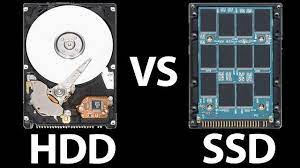
Solid-state arrays are the next-generation solution for the rapid storage and delivery of data and applications. They provide random access times magnitudes faster than hard disk drives–approximately .1 millisecond, compared to 5 to 10 milliseconds. They are available with common interfaces like SATA and SAS RAID, rendering them easy to integrate into SAN and network NAS storage environments.
With their superior input/output (I/O) speeds, they effectively support storage virtualization, cloud storage, unified storage, storage for video, data archives, and high-performance, mission-critical applications. They resolve I/O issues without the cost and complexity of deploying large numbers of conventional, frequently under-utilized hard drives. As a result, SSD arrays are often the top tier in an automated storage tiering strategy, which is called Tier 0.
Among their many applications, they are ideal for addressing the boot storms of virtual desktop infrastructure (VDI) deployments. Boot storms occur when hundreds or thousands of users concurrently log in at the beginning of the workday, overwhelming the I/O performance of spinning disk storage arrays. With their extraordinary read performance, SSD arrays can mitigate this problem.
Another good use case is bolstering cloud storage. Clouds are cost-effective repositories for large amounts of data, but accessing data from the cloud can result in latency. Enterprises can deploy an SSD array in the data center to host frequently used data that resides on the cloud. They will gain the economies of cloud storage with the blistering speeds of an onsite SSD array—a win-win situation.